


Table of Contents
If you’re looking for a fresh way to boost engagement on TikTok and Instagram Reels, CapCut’s AI Avatar feature is one of the fastest-growing trends to try. These animated characters can talk, move, and express personality—without needing fancy gear or a studio setup. Creators across niches like education, entertainment, gaming, lifestyle, and storytelling are using AI avatars to connect with audiences in a fun, relatable, and highly shareable way. The best part? You don’t need editing experience to make these videos. CapCut gives you ready-made avatars, customizable AI voices, and automatic subtitles, so you can create polished content in minutes.
Why AI Avatars Go Viral on TikTok & Reels
Short-form audiences love videos that feel personal, quick, and expressive. AI avatars fit perfectly into this trend for several reasons:
- They add personality without showing your face
Ideal for shy creators or those who prefer anonymous posting.
- They let you experiment with creative characters
You can be a futuristic robot today, a storyteller tomorrow, and an animated teacher next week—no limits.
- They stand out visually
TikTok and Reels are crowded spaces. A bold, animated character grabs users’ attention immediately as they scroll.
- They save time
Since your avatar does the talking, you don’t have to retake shots or worry about lighting, makeup, or camera angles.
- They help creators stay consistent
When you’re busy, an AI avatar can deliver content for you, keeping your page active.
Trending CapCut AI Avatar Ideas Worth Trying
Here are creative concepts you can use to boost engagement and attract new followers:
- AI Storyteller Avatar
Tell short stories—true, fictional, emotional, or funny—using a character with a matching personality. These perform extremely well in Reels. Try CapCut Text to Speech AI to create an amazing narration.
- Study Tips / Teacher Avatar
Perfect for students and education pages. Avatars make learning fun and digestible.
- Daily Motivation or Affirmation Avatar
Short, uplifting messages narrated by a friendly character get lots of shares.
- Meme-Style Reaction Avatar
Choose a silly or exaggerated character and use it to react to trends, comments, and viral sounds.
- Mini Vlogger Avatar
Instead of showing your face, your avatar can narrate your day, experiences, or thoughts.
- Product Review or Unboxing Avatar
A great way to showcase items while keeping the video fun and engaging.
- Digital Spokesperson for Your Brand
Small business owners can use avatars to introduce products, talk about promos, or explain services.
- Character Dialogue Videos
Create two avatars and make them “talk” to each other with different AI voices.
- Transformation / Glow Up Avatar
Tell a before-and-after story, style upgrade, or digital transformation journey.
- Comic or Anime-Style Avatar Skits
These consistently go viral on TikTok thanks to their expressive animations.
How to Create a CapCut AI Avatar to Boost Engagement on TikTok & Reels
CapCut Desktop Video Editor features powerful AI tools that can transform your video into professional, high-quality content. Let’s explore the steps to create a CapCut AI Avatar to boost your TikTok and Reels.
Step 1: Access the AI Avatar
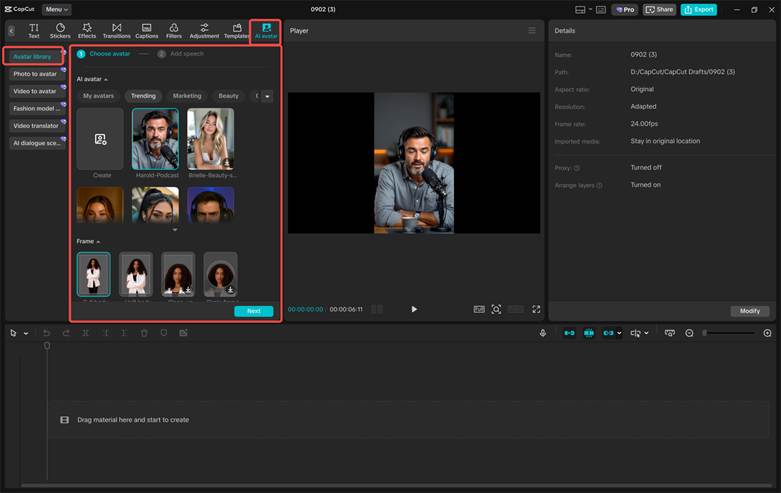
Open CapCut, then navigate to “AI Avatar” > “Avatar Library”. Browse through over 1,000 characters and select your favorite to use in your project. Then, click “Add Speech” to select from 150+ AI voices and make your character talk. Pick a tone that matches your content style—friendly, dramatic, deep, energetic, or professional. Finally, click “Generate” to bring your avatar to life. This step turns your script or ideas into a talking animated character. In just a few seconds, CapCut generates a smooth, ready-to-edit clip that feels polished and expressive.
Step 2: Edit Your Avatar Video
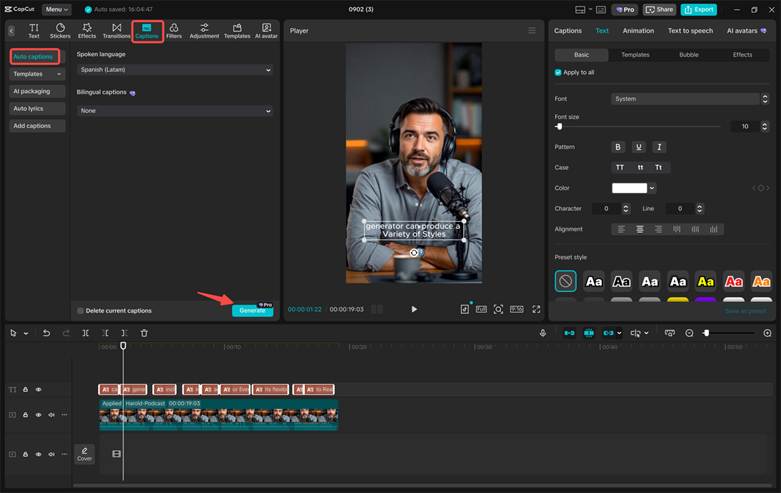
Polish your avatar using “Filters” to enhance the colors and overall mood. You can also change the background to a studio, classroom, futuristic space, aesthetic room, or even your brand colors. Next, click “Captions” > “Auto captions” to generate subtitles automatically. Subtitles help increase watch time—especially on TikTok and Reels, where most users scroll with the sound off. These simple tweaks make your avatar look more dynamic and fit perfectly into the short-form content style.
Step 3: Export Your Avatar
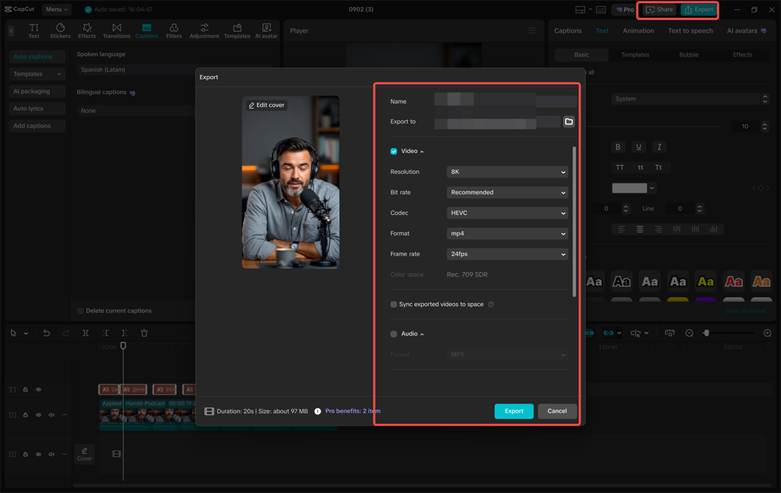
Export your finished character to your device or share directly on TikTok, Instagram Reels, or YouTube Shorts. CapCut lets you choose the right resolution for each platform—usually 1080p works best for vertical videos. Once uploaded, your AI avatar can shine online and attract new viewers. If you pair your avatar video with trending hashtags, engaging captions, and good timing, you’ll have a strong chance of landing on the For You Page or Explore Page.
Conclusion
CapCut’s AI Avatar tool is more than just a trend—it’s a creative shortcut to making standout content on TikTok and Reels. Whether you’re storytelling, teaching, reviewing products, motivating others, or running a small business, AI avatars help you connect with viewers in a fun, polished, and efficient way.
