 Blogging Heros
Image editing is no longer difficult. People used to be confused by complicated brushes, layers, and cursors of various editing programs that were incredibly difficult to use. Luckily, VanceAI has released a highly advanced AI software for PCs that can easily improve the quality of every image. It’s VanceAI PC, which is available to everyone.
This software is very simple to use even if you have no experience with editing.
Within a few clicks, you can immediately transform the photo’s resolution from poor to excellent. It’s that great! Click VanceAI Software for a quick download.
Interested in learning more? Everything is covered in this review.
What is VanceAI PC?
VanceAI PC is the top editing program that can automatically turn the quality of any image from bad to excellent. It outperforms other editing applications because it employs powerful artificial intelligence to process images. This AI works like magic in improving the image quality.
Take a peek at the features of VanceAI PC software to learn more.
Features
Here are some key features of VanceAI PC software:
- It also removes grains or noises from the images, making them look more realistic.
Pros
- Simple to use.
- Improves image quality and makes photographs appear more natural.
- Enlarges pictures with a few clicks.
- Removes grains, fuzz, and JPEG artifacts from images.
- It is available for free download.
Cons
- It requires the internet to sign up and download.
VanceAI PC Review
VanceAI software can do a variety of things to a photo, which are classified into three types. When you download this AI program for PC, you will be presented with 3 alternatives regarding how to deal with your image. These are the Enlarge, Denoise, and Sharpen options.
Let’s take a closer look at them.
VanceAI Image Upscaler: Enlarge Images and Keep Resolution
If you want to magnify your favorite photos without sacrificing quality, VanceAI Image Upscaler is good choice. It provides several options for AI Image upscaling online. Select how much you want to upscaler, the picture type, and leave the rest to our Image Enlarger. To upgrade the images, no sophisticated brushes or zooming are required.
VanceAI Image Upscaler can magnify photographs up to 40x without generating blur, blockiness, grains, or other problems.
The powerful AI algorithms are key for its high efficiency. It increases pixels, brightens up colors, improves facial features, and minimizes blockiness when it enhances images. As a result, after upscaling, the picture will still be in HD quality.
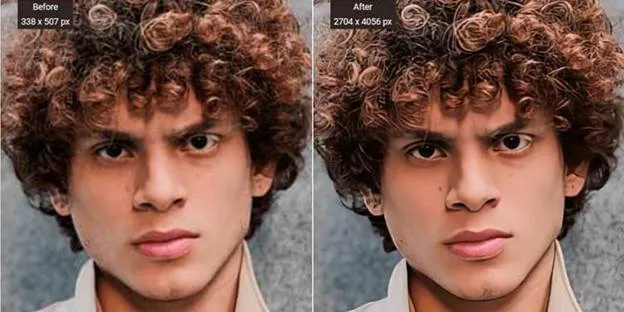
Here’s a sample of a photo of Before and After VanceAI Image Upscaler processing.
VanceAI Image Sharpener: Unblur Images Effortlessly
Don’t get upset when your favorite photos include blurring. Simply send them to VanceAI Image Sharpener. This program will quickly eliminate any type of haze.
In general, there are three types of blurriness in a photograph. The first is created by motion, the second by the lens, and the last by a subtle blur. Whether your photo features one or all of these blurs, the photo enhancer will remove them all in a short amount of time.
Before it was released, this AI program for PC was tested on millions of fuzzy images and successfully repaired all of them. As a result, you can rely on VanceAI Image Sharpener to have your photographs look more realistic.
But hold on. There’s even more about it.
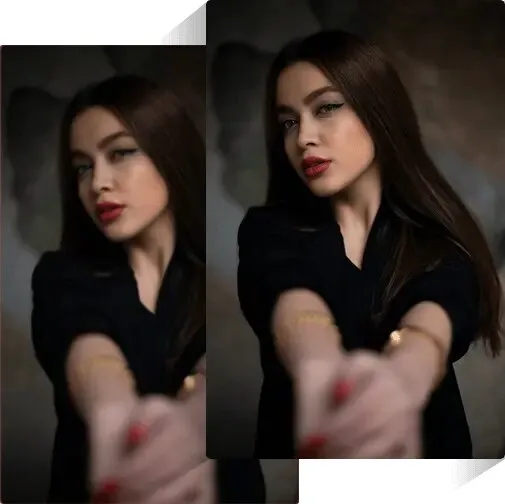
VanceAI Image Sharpener also improves photo quality by adjusting contrast and brightness. Additionally, the facial recognition algorithms increase the facial details.
Here is a picture before and after using VanceAI Image Sharpener:
VanceAI Image Denoiser: Denoise Pictures Online
VanceAI Image Denoiser is maybe the greatest tool for denoising images. It is quick and efficient, since the sounds may be removed in a matter of seconds. You just upload one or the majority of the images and begin the processing. You’ll have denoised photographs on your PC’s screen in no time.
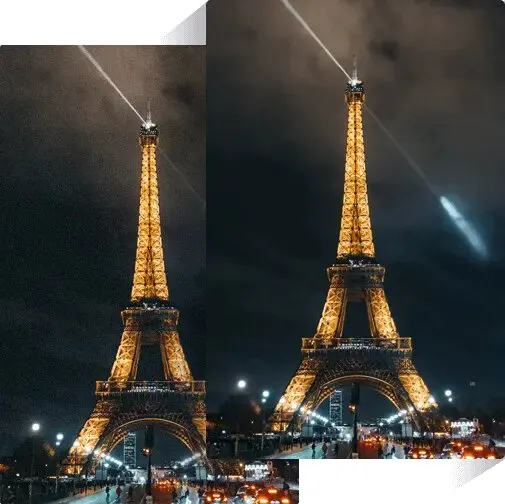
This Image Denoiser is extremely successful because it features neural networks that can correct the grains on the images (which improves the quality).
Deep Learning finds items in images and improves the information surrounding them.
Here’s a picture of before and after processing
Now you can trust VanceAI Image Denoise and use it!
How to Use VanceAI PC?
VanceAI software is really simple to use. If you want to enlarge images, VanceAI Image Upscaler will be required for this.
The following is a step-by-step instruction for a VanceAI Desktop client:
Step 1: Visit the VanceAI PC website and download the program. Then, install and start it.
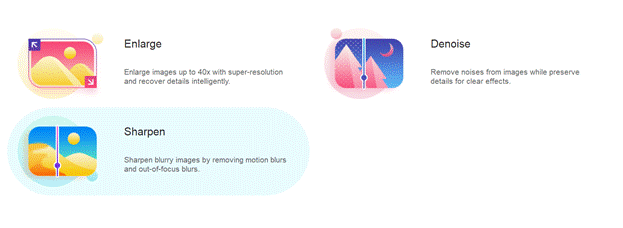
Step 2: Hit the “Enlarge“, then upload the image by pressing on the “Plus” button or dragging it there. Select the AI upscaling settings on the right, and then begin the work.

The image will be upscaled in seconds. VanceAI PC makes image upscale simple.
Conclusion
VanceAI PC is an all-in-one software that can edit any picture you desire with ease. It utilizes powerful AI and deep learning techniques to quickly upscale, denoise, and sharpen any image.
When using VanceAI software, you may simply alter the destiny of a photo from poor resolution to HD.
FAQs
1. What Else Can I Do with VanceAI Image Upscaler?
With a few clicks, VanceAI Image Upscaler can upscale any image. It gives you several choices for enhancing photos (from 2x to up to 40x). Select how you want to improve and then let it do the rest. It will produce the best results possible while maintaining quality.
2. What Can I Do with the VanceAI Photo Editor?
Thousands of people use VanceAI Photo Editor to edit their photographs. You can use it to enlarge, denoise, restore quality, sharpen, remove backgrounds, and do a variety of other things with your pictures. You can also adjust or crop the images there. What’s the best part? It will only take a few seconds to complete all of this.